Tour tickets are emotional little things. Your guest has paid, planned, and probably promised their partner they “definitely know where we’re going”. Then the voucher opens, the address is vague, and suddenly it’s panic o’clock.
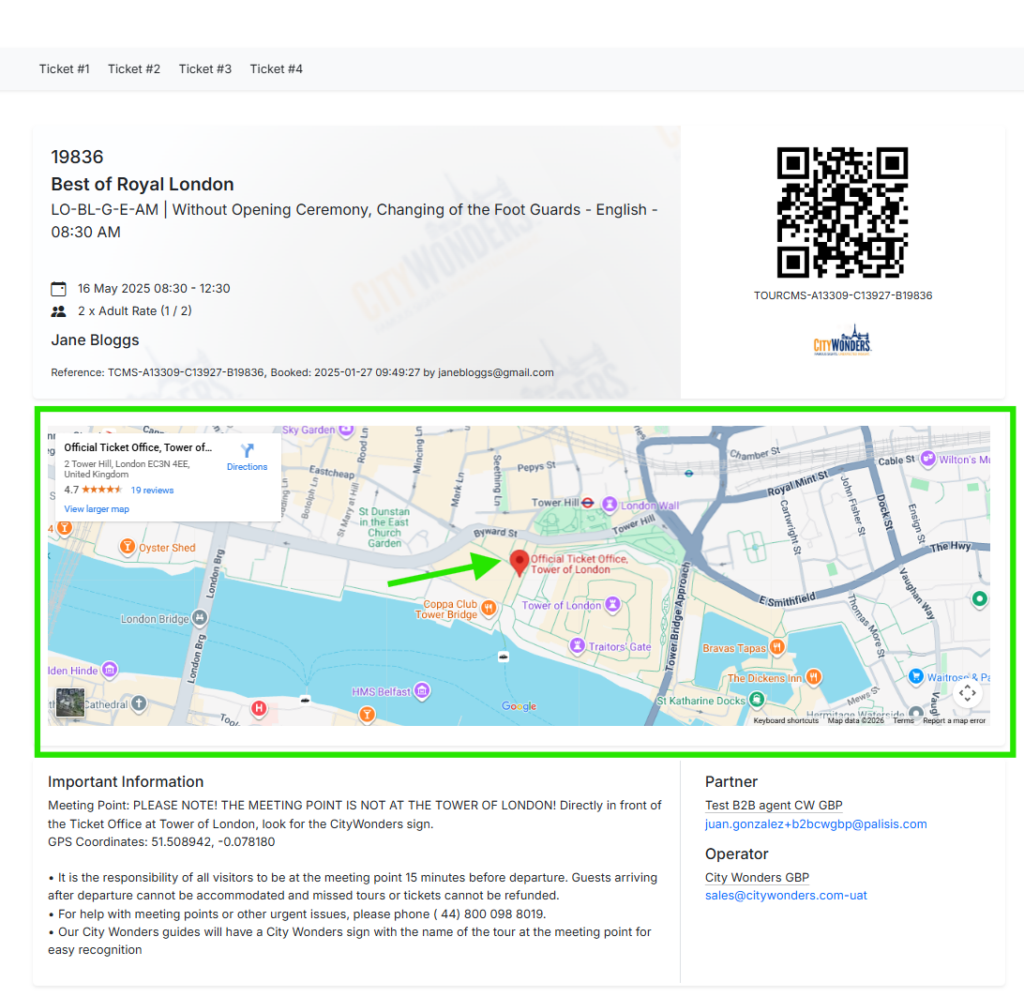
That exact moment is why we’ve upgraded the TourCMS voucher design to include an interactive map for meeting points.
Why this matters now
This shift is only possible because traveller behaviour has changed. Phones are no longer a “nice to have” when you travel. In Europe, mobile subscriber penetration is projected to be around 89%. And maps have become the default travel tool. Google has said that Google Maps is used by more than 1 billion people every month, and more recently highlighted usage in the billions.
So yes, travellers can usually find your meeting point. But “usually” is not what your support team deals with. And with vouchers becoming the new normal in the realm of travel, its never been more crucial to get it right.
The hidden cost of “Where do I go?”
When meeting point info is hard to act on, the same problems show up again and again:
- Guests arrive late, flustered, or at the wrong entrance
- Guides spend time doing phone triage instead of welcoming the group
- Box offices and support teams get repeat queries on the day
- You end up making goodwill refunds for something that was avoidable
And it’s not rare. One navigation survey found that 65% of respondents had trouble finding a meeting venue while travelling. (It’s a commercial survey, but the number will feel painfully familiar to anyone who has ever run a meeting point in peak season.)
What’s new in the voucher
The new voucher design includes an interactive Google Map, allowing guests to tap once to get directions to the meeting point directly from their digital voucher.
This is the difference between a simple “here’s the address, good luck!” and a truly tailored guide that helps the customer find you precisely. Showing them where to go, as well as how to actually get there.
It’s a small change that removes a lot of friction, especially when tourists are in a destination that they’ve never been to before.
The practical benefits for operators
Fewer day-of questions
If the voucher answers “where is it?” clearly, your inbox stays quieter when it matters most, after all the best updates let your staff do their job, rather than messing with operational or admin issues.
More on-time arrivals
When guests can start navigation with one tap, you reduce the “I’m nearby” phone calls that are never actually nearby.
A better first impression
The meeting point is often the first real-world moment of your experience. A calm arrival sets the tone.
The pitfalls, and how to handle them
Phone-first doesn’t mean phone-only. There are still real-world reasons some guests will struggle:
Spotty data and roaming
Tourists still get caught out by roaming settings or patchy signal. A simple fix is to keep the written address and a short “look for” line alongside the map pin.
Older demographics and paper preference
Some guests still want paper, and that’s fine. The win here is “less paper”, not “no paper”. Digital vouchers reduce printing as the default, while keeping flexibility for the guests who need it.
Pins need to be precise
If your pin is set to the wrong side of a building, the map is only confidently wrong. It’s worth double-checking pins for big attractions, parks, and multi-entrance venues.
Where to find it
This updated voucher design is now available in TourCMS, so your guests can use the digital voucher to navigate directly to the meeting point. Check out how to set up your vouchers in this new style with our support centre.
If you want help reviewing your meeting point setup, or you’ve got tricky locations (multiple entrances, seasonal points, moving pickup spots), get in touch, and we’ll point you to the best practice approach.